Introduction: What “No Category Base WPML” Means
“No category base WPML” means removing WordPress’s default category prefix while keeping category archive URLs correct in every WPML language. Instead of an English archive such as example.com/category/news/, you may use example.com/news/. A Spanish version might become example.com/es/noticias/ rather than example.com/es/category/noticias/.
The result looks simple. The setup is not always simple.
WordPress uses rewrite rules to map readable URLs to taxonomy queries. WPML adds another layer for language directories, domains, or URL parameters. It also connects translated category terms and slugs. Your base-removal method, permalink settings, theme, SEO plugin, cache, and server rules must agree on the final route.
Important: WPML translates multilingual content and taxonomy data, but it is not, by itself, a universal category-base removal switch. Use a maintained, compatible WordPress method for removing the base, then test it with WPML.
QueueLingo helps teams move WPML translation jobs through hosted queues and connected translation engines, so category names, related content, and multilingual updates can be managed at a larger scale.
Start a free QueueLingo account or watch the demo before planning a full-site multilingual rollout.
Why Category Bases Matter for Multilingual SEO
A standard WordPress category archive often uses this pattern:
https://example.com/category/news/https://example.com/category/tutorials/
The word category is the category base. A site can replace it with another base, such as topics, but leaving the Category base field empty in Settings → Permalinks normally means WordPress uses its default behavior. Removing the base entirely usually requires a compatible plugin, theme feature, or carefully maintained custom rewrite logic.
In a multilingual setup, the URL can also contain a language signal:
- Directory:
example.com/es/category/noticias/ - Language domain:
example.es/category/noticias/ - Parameter:
example.com/category/noticias/?lang=es
WPML supports language directories, different domains or subdomains, and language parameters. A category URL is therefore shaped by three decisions: language format, category base, and translated term slug.
Crawl paths and translated archives
Search engines discover category archives through menus, breadcrumbs, post metadata, sitemaps, and internal links. Removing one path segment may make a URL easier for people to read, copy, and recognize. It does not guarantee a ranking increase. The larger SEO benefit comes from having one stable, crawlable URL for each useful archive.
A translated category archive should normally provide:
- A successful
200response. - Content in the intended language.
- A self-referencing canonical URL.
- Correct alternate-language
hreflangreferences. - Internal links that use the final clean URL.
- Inclusion in the correct XML sitemap when the archive is indexable.
Google describes canonicalization as the process of selecting a representative URL from duplicate or similar pages. Redirects, canonical annotations, sitemap URLs, and internal links can all influence that selection. For multilingual pages, the canonical should normally point to the canonical URL in the same language, while hreflang connects equivalent language versions.
When removal improves the user experience
Removing the category base is most useful when categories are a key navigation layer and their slugs are unique. A publication may use /en/insights/, /de/einblicke/, and /fr/analyses/. These paths are concise. However, a visible base can prevent ambiguity. A URL such as /topics/security/ immediately tells a reader that the page is a topic archive. Do not remove the base only because shorter looks “more SEO friendly.” Choose the structure that is clearest and easiest to maintain.
For a wider review of language targeting, see the multilingual SEO guide.
How WPML Handles Category URLs
WPML separates the language URL format from the translation of taxonomy terms. Understanding that split makes troubleshooting much faster.
Language URL formats
In WPML → Languages → Language URL format, WPML supports three common models:
- Directories:
example.com/es/noticias/ - Domains or subdomains:
example.es/noticias/ores.example.com/noticias/ - A language parameter:
example.com/noticias/?lang=es
Directories are common because every language stays under one domain. Different domains require correct DNS and server mapping. Parameters usually need fewer server changes, but many site owners prefer path-based URLs for public navigation.
WPML language directories are virtual. Do not create physical /es/ or /de/ folders or force requests into them.
Translated terms and slugs
A category has a display name and a slug. For example:
- English name: News; slug:
news - Spanish name: Noticias; slug:
noticias - German name: Nachrichten; slug:
nachrichten
WPML can translate WordPress categories, tags, and custom taxonomies. Taxonomies must be set as translatable in WPML → Settings → Taxonomies Translation. You can review term translations in WPML → Taxonomy Translation and synchronize hierarchy changes when parent-child structures change.
A custom taxonomy base can also have language-specific translations. That is separate from removing the standard WordPress category base. If your site has no category base, the translated term slug becomes the visible path segment, which makes unique slug planning even more important.
Permalinks and rewrite rules
WordPress does not store every pretty URL as a physical file. It compares each request with rewrite rules and converts a matching path into a query. A base-removal method changes those rules. WPML then filters URLs and queries according to the active language.
Conflicts can appear when another component also changes routing. Common sources include:
- SEO or permalink plugins.
- Redirect managers.
- Custom post types with overlapping rewrite slugs.
- Themes that register taxonomies or routes.
- Server-level NGINX or Apache rules.
- CDN edge redirects or cached error responses.
Test the full stack, not only the WordPress settings screen. A URL can look correct in the admin yet return the wrong language or status at the edge.
Benefits and Trade-Offs of No Category Base in WPML
The decision is not “clean URLs are good and bases are bad.” It is a routing trade-off.
| Area | Potential benefit | Risk or cost |
|---|---|---|
| Readability | Short category paths are easier to scan and share. | A path may no longer reveal that it is a category archive. |
| Multilingual UX | Each language can use a natural translated category slug. | Similar translations may create collisions across content types. |
| Crawling | Consistent internal links can lead crawlers directly to the preferred URL. | Old and new routes may both remain accessible without redirects or canonicals. |
| Migration | A simpler structure can become the site-wide standard. | Every indexed category URL may change and require a mapped redirect. |
| Maintenance | A well-tested rule can keep paths predictable. | Plugin, theme, WordPress, or WPML updates can affect rewrites. |
| Large taxonomies | Editors work with shorter public paths. | Hundreds of translated terms require governance and collision checks. |
Duplicate routes
Some base-removal solutions redirect /category/news/ to /news/. Others make both versions load. If both return 200, search engines and analytics systems may see duplicate routes. Select one preferred version, redirect deprecated URLs, use self-referencing canonicals on the final pages, and update internal links and sitemaps.
Slug collisions
Without a namespace such as /category/, a category slug competes in the root path. Imagine that all of these want /guides/:
- A page named Guides.
- A category named Guides.
- A custom post type archive.
- A translated term that becomes
guides.
WordPress may resolve one route and hide another, or a plugin may force a redirect. Build a multilingual slug registry before launch. Include pages, posts, categories, tags, custom taxonomies, author bases, and custom post type archives.
Cumulative multilingual content translated
Translation volume across five customer projects using QueueLingo-assisted WPML workflows.
How to Set Up No Category Base with WPML
Use a staging copy first. URL changes can affect every category archive, internal link, sitemap entry, canonical, and cached redirect.
1. Back up the site
Create a restorable backup of the database and files. Record the WordPress, WPML, theme, routing-plugin, cache, and server versions. Export existing redirects.
2. Inventory existing URLs
Export every category archive in every language. For each URL, record:
- Language.
- Category name and term ID.
- Current slug.
- Parent category, if any.
- Current canonical.
- Intended clean URL.
- Required redirect target.
Also crawl pages, posts, custom post types, and taxonomy archives to find collisions. Do this before changing rewrite behavior.
3. Review WordPress permalinks
Open Settings → Permalinks. Confirm that the site uses a pretty permalink structure rather than plain query URLs. Review the optional Category base field, but remember that an empty field does not necessarily mean “remove the base.” It may simply use WordPress’s default category route.
Choose one maintained method for base removal. It may be a compatible permalink feature or custom code owned by your development team. Avoid stacking two tools that both remove the base.
4. Confirm WPML’s language configuration
Open WPML → Languages and verify the active URL format. Test the default and secondary languages before continuing. If you use directories, confirm that the server handles virtual language paths. If you use separate domains, confirm DNS, TLS certificates, and the same WordPress installation mapping.
5. Map and translate category terms
In WPML → Settings, make Categories translatable. Then open WPML → Taxonomy Translation and review each translation. Use natural, unique slugs rather than copying the source slug blindly.
For hierarchical categories, confirm that translated children have the correct translated parents. Synchronize hierarchy changes where needed. Save the slug map as release documentation.
6. Enable the base-removal method and flush rules once
Activate the selected method in staging. Then regenerate rewrite rules. The normal admin action is to open Settings → Permalinks and save the settings once. Teams using WP-CLI can use the appropriate rewrite flush command in a controlled deployment.
WordPress warns that flushing rewrite rules is an expensive operation. Do not run it on every page request or on a frequent hook. Trigger it only when rules actually change.
7. Test every language and template
Test a representative set that includes:
- Top-level and child categories.
- Categories with translated and untranslated terms.
- Paginated archives, such as
/news/page/2/. - Feeds, if your site publishes them.
- Logged-in and logged-out requests.
- Each configured language directory or domain.
For each final URL, check the status code, page title, archive heading, body language, canonical, hreflang, breadcrumbs, sitemap entry, and internal links.
8. Add redirects and deploy carefully
Create one-to-one permanent redirects from each old category URL to its exact new equivalent. Avoid sending every old category to the home page. Google recommends permanent server-side redirects, such as 301 or 308, when a URL has permanently moved.
Update internal links, menus, breadcrumbs, sitemap URLs, canonicals, and hreflang values to use the new paths. Deploy during a monitored window, purge caches once, and keep a rollback plan.
Common Issues and Troubleshooting
Translated category pages return 404
First save Settings → Permalinks once to regenerate rules. Then confirm that the category translation exists, its taxonomy is translatable, and its parent hierarchy is valid. Disable only one suspected routing layer at a time in staging. If the origin returns 200 but the public URL returns 404, inspect CDN or proxy caching.
Redirect loops after changing permalinks
A loop often means two systems are normalizing the same URL in opposite ways. Check WordPress redirect plugins, SEO canonical redirects, .htaccess or NGINX rules, WPML language redirects, and CDN edge rules. Trace the complete redirect chain. The final URL should return 200, not redirect back to an earlier hop.
The wrong language category appears
Confirm that each term is connected to the correct WPML translation and that the request contains the expected language context. Check menus and hard-coded theme links. On cached sites, ensure the cache key varies by WPML’s selected language mechanism. A cache that ignores the language directory, domain, parameter, or cookie can serve the wrong archive.
Slugs conflict across languages
Compare the problem slug with pages, posts, media attachment routes, custom post type archives, tags, and other taxonomies. Rename one route with a clear language-specific slug. Then update the redirect map, internal links, canonical, hreflang, and sitemap.
CDN or cache rules keep old behavior
Purge the WordPress page cache, object cache where relevant, reverse proxy, and CDN. Review cached 301 responses because browsers and edge networks may retain them. Test the origin separately from the CDN, then test a clean browser session.
Google Search Console reports coverage or canonical warnings
Inspect both the old and new URL. Verify that the old URL permanently redirects to the exact replacement and the new URL returns 200. Confirm that the new archive has a self-canonical, is not blocked by robots rules, and appears in the intended sitemap. Check whether Google selected a different canonical. After corrections, request validation or recrawl through the relevant Search Console workflow.
QueueLingo Workflow for Scalable WPML Translation
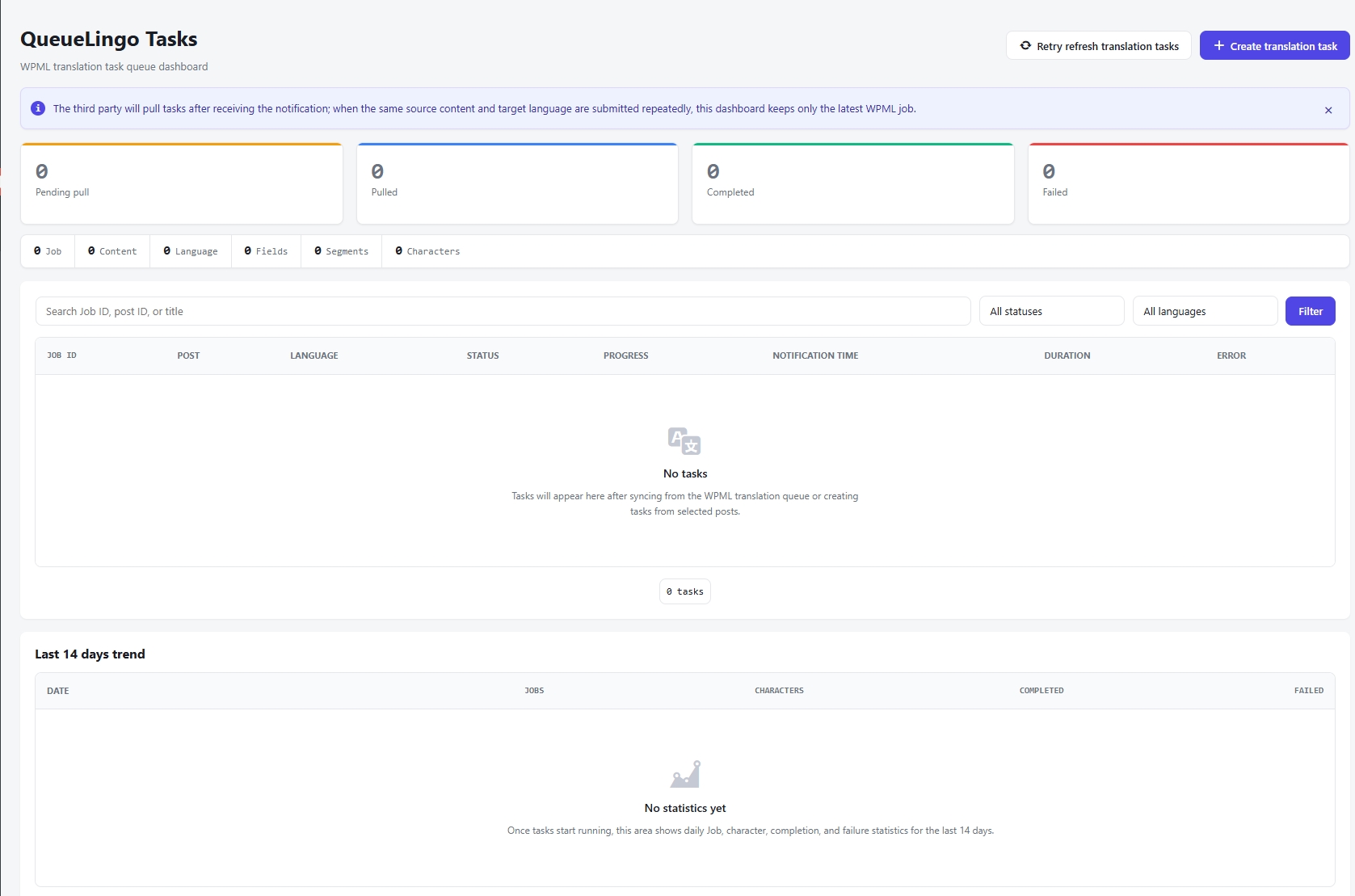
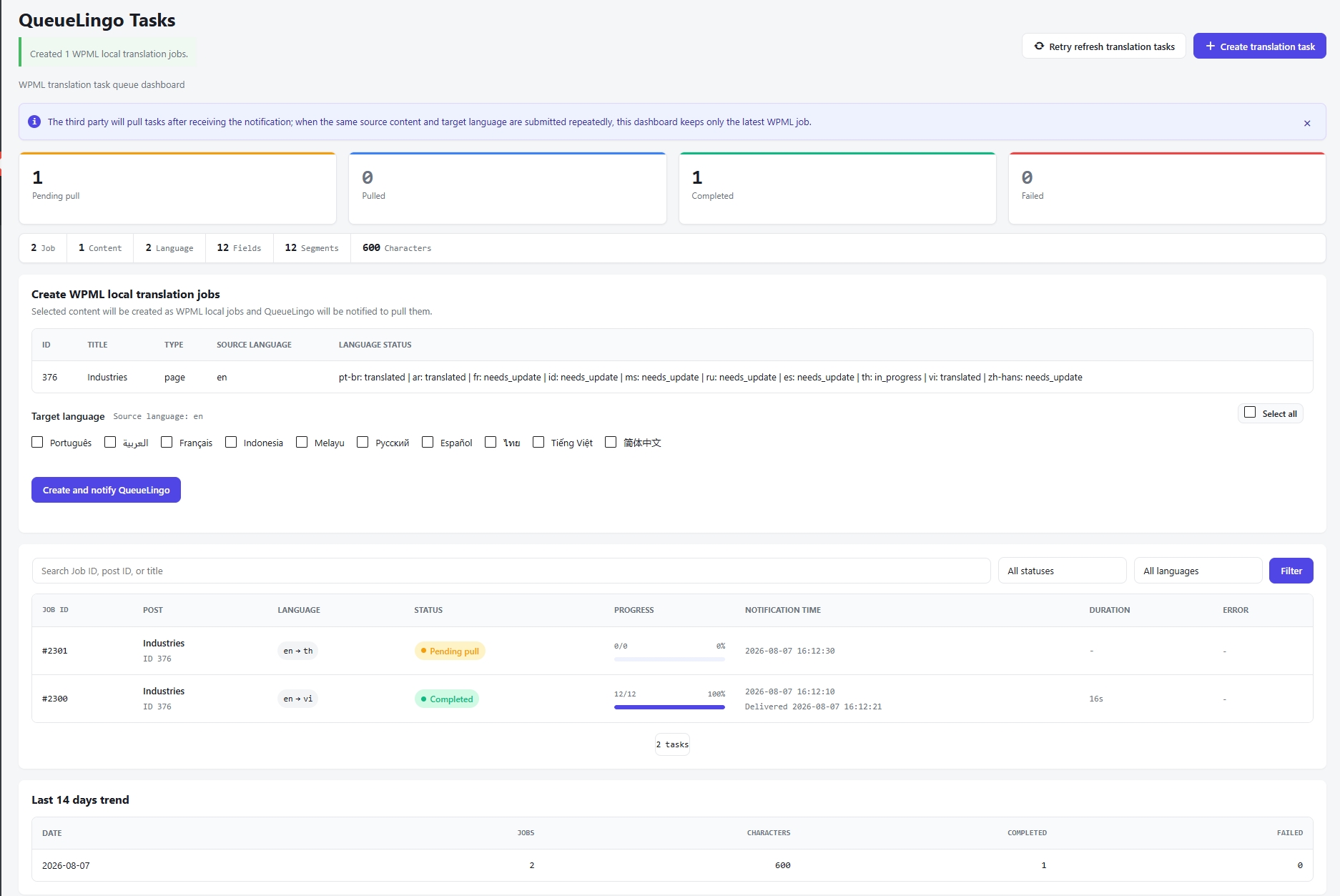
Explore the complete translation workflow
The live demo shows how WPML content enters QueueLingo, moves through the selected engine, and returns for review and delivery.
Open the live demoURL engineering and translation operations should support each other. A developer can make /es/noticias/ resolve correctly, but the category still needs an accurate name, slug, description, linked content, and review status.
A scalable QueueLingo workflow can follow these stages:
- Prepare WPML: define languages, taxonomy translation settings, and the approved slug map.
- Create translation jobs: send eligible WPML content and related taxonomy text into managed translation queues.
- Select an engine: route work to Google Translate, Edge Translate, or supported LLM translation engines according to your organization’s configured integrations, language pair, content type, budget, and data policy.
- Review results: check terminology, category names, slug length, intent, HTML integrity, and local market wording.
- Write back and publish: return approved translations to WPML, then run URL, canonical, and
hreflangchecks.
Queue automation can reduce repetitive export, assignment, status tracking, and write-back work. Human review still matters because one awkward taxonomy translation can affect navigation and many post URLs.
Explore WPML translation hosting, watch a demo, or start a free trial.
Why customers choose QueueLingo
Faster delivery, flexible translation engines, and a translation process that stays under your control.
Translation efficiency
- Quickly synchronize and translate WPML content.
- Use LLM-driven workflows to shorten translation cycles.
- Launch large multilingual content libraries faster.
Translation quality
- Select a suitable LLM for each content scenario.
- Control terminology, context, and brand voice.
- Combine AI translation with human review and optimization.
Controllable costs
- Reduce repetitive work compared with fully manual translation.
- Configure engines flexibly for different content priorities.
- Match translation budgets to project scale.
Delivery speed
- Connect WPML content intake, translation, review, and delivery.
- Process large content batches without repeated copy-paste work.
- Shorten the path to a multilingual site launch.
“We translate a high volume of product and marketing content every month. The workflow is straightforward, and we can choose the right LLM for each content type to balance cost and quality.”
- 6 supported languages
- 214,000 words translated
- Average delivery within 24 hours
- 1,500+ pages processed monthly
“Professional content requires accurate terminology. We value being able to control and adjust the translation workflow instead of depending entirely on one fixed translation model.”
- 5 supported languages
- 78,000 words translated
- 1,200+ approved glossary entries
- Customer review approval rate above 96%
“Adding a new website language used to require coordination across several steps. Now WPML content can enter the translation workflow faster, which makes a clear difference for a frequently updated website.”
- 10 supported languages
- 189,000 words translated
- Delivery speed improved by about 4.2×
- Total translation costs reduced by about 51%
Make AI translation faster—and keep the process controllable
Controllable LLM engines
Choose and configure LLM translation engines according to project needs instead of being locked into one model.
A WPML-focused workflow
The process is designed around WordPress and WPML content structures, reducing manual copying, pasting, and repeated operations.
Fast, stable delivery
Optimize content intake, AI translation, review, and result delivery so multilingual content can go live sooner.
Quality and cost balance
The goal is not simply cheaper AI translation, but the right balance of quality, speed, and cost for each project.
Implementation Checklist and Best Practices
Before launch:
- Back up files and the database, and verify restore access.
- Test the change on staging with the production plugin and server stack.
- Export all category URLs in every language.
- Map old URLs to final translated URLs.
- Reserve unique category slugs across all public content types.
- Confirm category translations and parent-child relationships in WPML.
- Choose one base-removal method and document its owner.
- Test directories, domains, or parameters according to WPML settings.
- Prepare exact
301or308redirects. - Update internal links, canonicals,
hreflang, breadcrumbs, and sitemaps.
After launch:
- Crawl the old and new URL sets.
- Check for
404, soft404,5xx, loops, and long redirect chains. - Review origin, WordPress, CDN, and browser cache behavior.
- Monitor server logs and Google Search Console reports.
- Keep redirects in place.
- Retest after WordPress, WPML, theme, routing-plugin, or server updates.
- Document rollback steps, data handling, translation retention, access control, and compliance requirements.
The safest no category base WPML launch is not the one with the cleverest rewrite rule. It is the one with a complete URL map, unique translated slugs, one preferred route per archive, and repeatable tests.
Ready to make the translation side easier? Try QueueLingo free or contact sales for a larger multilingual WordPress workflow.
FAQ
What is no category base WPML?
It is a WordPress and WPML setup where category archive URLs omit the usual category prefix. For example, /es/category/noticias/ becomes /es/noticias/. A compatible base-removal method changes WordPress routing, while WPML manages languages and translated taxonomy terms.
Is removing category base good for SEO?
It can improve readability and consistency, but it is not an automatic ranking boost. SEO depends on stable crawlable URLs, exact redirects, self-canonicals, correct hreflang, useful archive content, and consistent internal links.
Can WPML translate category slugs?
Yes. WPML can translate category names and slugs through its taxonomy translation settings. Make sure Categories are translatable, review each term translation, and keep slugs unique across the site.
Why do translated category pages return 404?
Common causes include stale rewrite rules, a missing term translation, an incorrect translated hierarchy, a slug collision, an incompatible base-removal method, or a cached 404 at the CDN. Test WordPress at the origin before blaming WPML alone.
Do I need redirects after changing category URLs?
Yes, if old URLs were public, linked, crawled, or indexed. Create a permanent one-to-one redirect from each old category archive to its closest new equivalent. Also update internal links, canonicals, hreflang, and sitemaps.
Can QueueLingo automate WPML translation queues?
QueueLingo is designed to connect with WPML translation workflows, host translation queues, route content through configured translation engines, and support review and write-back. Confirm the exact connector, engine, retention, and plan features required for your site before rollout.
Official references
- WPML: Language URL format options — Open official documentation
- WPML: Translating post categories, tags, and custom taxonomies — Open official documentation
- WordPress Developer Resources:
flush_rewrite_rules()— Open official documentation - Google Search Central: Managing multilingual and multi-regional sites — Open official documentation
- Google Search Central: Canonicalization — Open official documentation
- Google Search Central: Redirects and Google Search — Open official documentation
Keep clean URLs. Remove repetitive translation work.
Use QueueLingo to coordinate WPML translation queues while your team keeps control of slugs, reviews, redirects, and release checks.